Resolve Article Scraping Issues via WAF
Introduction
When our system attempts to retrieve articles from your website, your Audioboost Publisher Manager may flag scraping failures. These are typically caused by security measures blocking our requests.
Available solutions:
- Whitelist our User-Agent (
speakup-article) on your server/WAF - Whitelist a unique GET parameter appended to our article URLs
Understanding WAF Interference
What is a Web Application Firewall (WAF)?
A WAF is a security layer between your web server and external traffic. It filters malicious requests (e.g., SQL injection, DDoS attacks) using predefined rules. While essential for security, WAFs can inadvertently block legitimate scrapers like ours.
How WAFs Interfere with Scraping
| Issue | Description |
|---|---|
| User-Agent Blocking | WAFs may ban unknown/unrecognized user agents |
| Rate Limiting | Frequent requests from a single IP address or agent trigger blocks |
| Signature Detection | GET parameters or headers may resemble attack patterns |
Common WAF and Reverse Proxy Providers
| Provider | Deployment Model |
|---|---|
| Cloudflare | Cloud-based (SaaS) |
| Akamai Kona Site Defender | Cloud-based (SaaS) |
| AWS WAF | Cloud (integrated with AWS services) |
| Imperva | Cloud / hybrid |
| F5 Advanced WAF | On-premises / hardware |
| Nginx | On-premises (web server / reverse proxy) |
| Varnish | On-premises (caching / reverse proxy) |
Solution 1: Whitelist Speakup User-Agent
Add our user-agent speakup-article to your WAF's allowlist. Select your provider below:
- Cloudflare
- Nginx
- Varnish
- Other / Generic
- Select the website that you want to manage
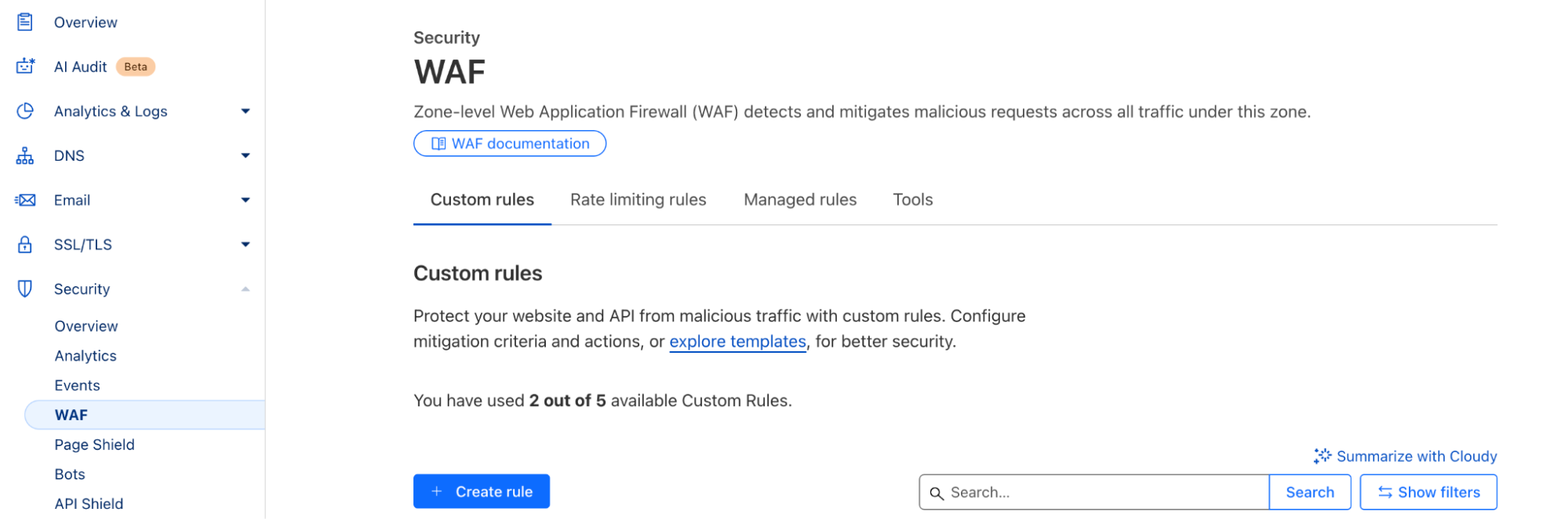
- In the right menu, select
Security > WAFand click "Create rule"
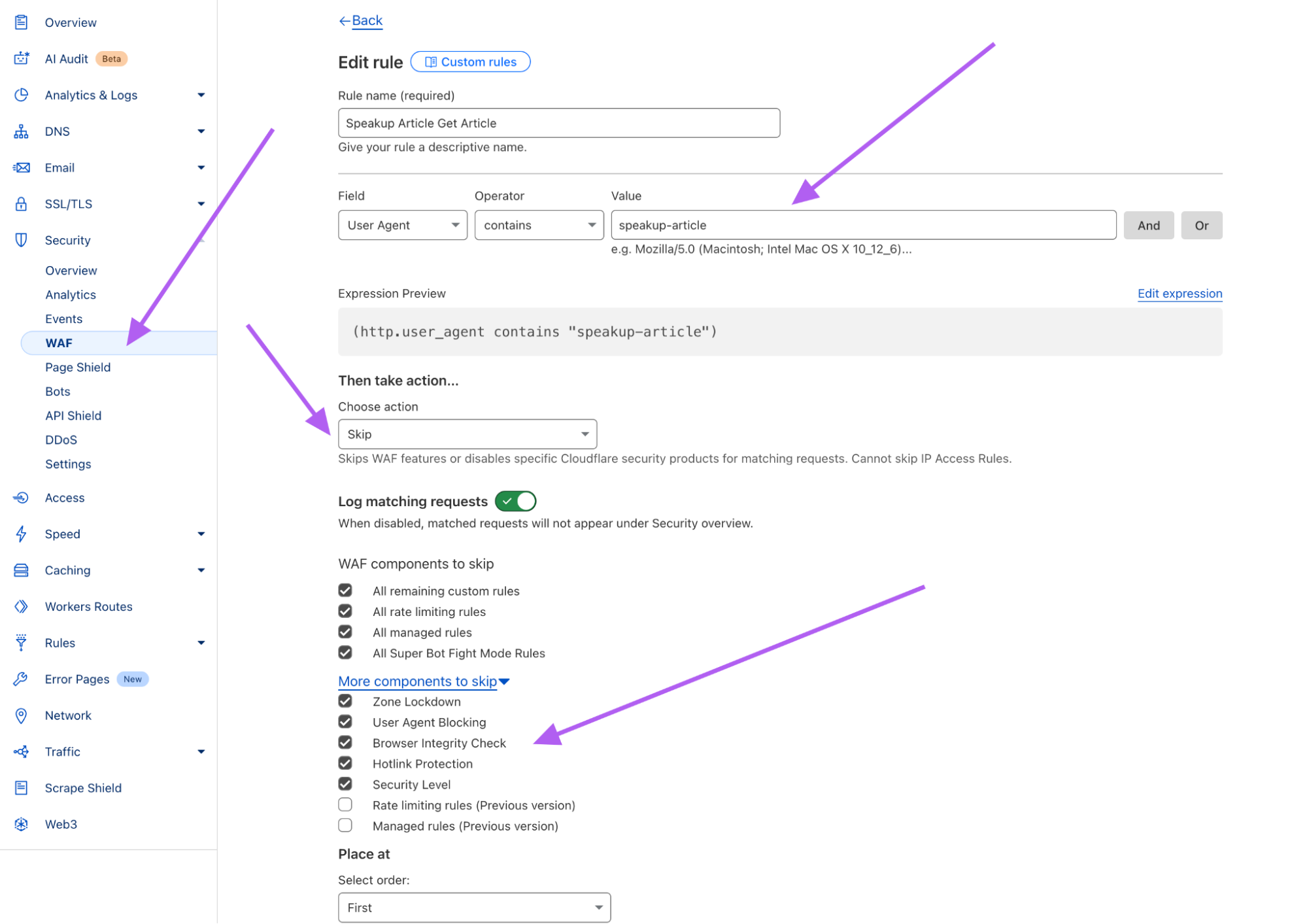
- Create a new rule with these settings:
- Field: "User Agent"
- Operator: "contains"
- Value:
speakup-article - Action: Skip
- Mark the WAF components to skip as shown below:
- Click "Deploy"
Depending on your Nginx setup, speakup-article may be blocked by user-agent filtering rules or by rate limiting. Follow the option relevant to your configuration.
Option A — Bypass User-Agent Blocking
If Nginx is configured to block unknown or specific user agents via a map directive, explicitly allow speakup-article:
# In the http block of nginx.conf
map $http_user_agent $block_ua {
    default             0;
    ~*bad-bot           1;
    ~*scrapy            1;
    ~*speakup-article   0;   # Explicitly allow the Speakup scraper
}

server {
    if ($block_ua) {
        return 403;
    }
    # ...
}
Option B — Exempt from Rate Limiting
If rate limiting (limit_req) is causing blocks, exclude the Speakup user-agent by mapping its key to an empty string — Nginx skips the rate limit zone entirely for empty keys:
# In the http block of nginx.conf
map $http_user_agent $limit_key {
    ~*speakup-article   "";                  # No rate limit for the Speakup scraper
    default             $binary_remote_addr;
}

limit_req_zone $limit_key zone=site_limit:10m rate=10r/s;

server {
    location / {
        limit_req zone=site_limit burst=20 nodelay;
        # ...
    }
}
After any change, test the configuration and reload:
nginx -t && nginx -s reload
In Varnish, allow speakup-article to pass directly to the backend by adding a rule at the top of vcl_recv in your VCL file (usually /etc/varnish/default.vcl):
sub vcl_recv {
    # Allow the Speakup Article scraper to reach the backend unmodified
    if (req.http.User-Agent ~ "speakup-article") {
        return(pass);
    }
    # ... rest of your rules
}
return(pass) sends the request directly to the origin backend, bypassing the Varnish cache and any subsequent blocking rules in vcl_recv. Placing it at the top ensures it takes priority over other rules.
After saving, apply the new VCL without restarting Varnish:
varnishadm vcl.load newconfig /etc/varnish/default.vcl
varnishadm vcl.use newconfig
Or restart the service:
systemctl restart varnish
- Access your WAF dashboard (e.g., AWS WAF, Akamai, Imperva)
- Navigate to "Security Rules" > "Allowlists" (or equivalent)
- Create a new rule:
- Match type:
User-Agent - Value:
speakup-article
- Match type:
- Set the rule action to
ALLOW(bypass other checks) - Save and deploy changes
Provider-Specific Documentation
- AWS WAF: User-Agent Allowlisting
- Akamai: Modify Kona Rule Sets
Solution 2: Whitelist GET Parameter
Use a unique parameter we'll append to article URLs:
https://example.com/article?scraper_token=speakup_article
Generic Steps
- In your WAF dashboard, locate "Allowlisted Parameters" (or "Ignore Rules")
- Add
scraper_tokento the allowlist - Configure the rule:
- Applies to path:
/*(all articles) - Action:
BYPASSorIGNORE
- Applies to path:
AWS WAF Example
{
	"Name": "AllowSpeakupScraperToken",
	"Priority": 1,
	"Action": "ALLOW",
	"VisibilityConfig": {
		"SampledRequestsEnabled": true,
		"CloudWatchMetricsEnabled": true
	},
	"Rule": {
		"Name": "scraper_token-param-rule",
		"Action": "ALLOW",
		"Match": {
			"QueryParameter": {
				"Key": "scraper_token",
				"Value": "speakup_article"
			}
		}
	}
}
Verification
Our team will perform a new scraping attempt within 24 business hours of whitelisting upon confirmation.
Need Help?
For issues, contact us at support@audioboost.com with:
- Your WAF provider name
- Example article URLs
- Blocked request logs (if available)
Summary
Whitelisting either our User-Agent or the GET parameter ensures uninterrupted article scraping. Most WAFs support these adjustments via their dashboards.
If your website uses a paywall to restrict content access, see our Publisher Paywall Configuration guide for additional setup steps.